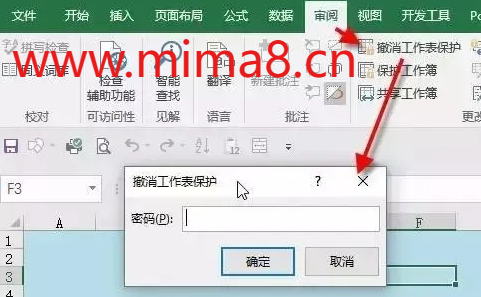
1. Workbook protection password cracking After protecting an Excel workbook (Review Protect Workbook), the worksheet cannot be inserted, deleted, or unhide. If you forget your password and want to remove workbook protection, let's work together with your senior sister.
Excel is often used in our daily work or study. We will send Excel to others through the internet, but sometimes, for the sake of company data security or privacy protection, and to prevent others from arbitrarily modifying or copying data, the usual method is to add a password to the Excel spreadsheet.
With the launch of the 40 series NVIDIA GPU super update, the company's product lineup has become quite complex. In the 4070 series alone, there are four models of NVIDIA GeForce RTX to choose from: the original 4070 and 4070 Ti, as well as the current 4070 Super and 4070 Ti Super. Understanding the diff
Usually, people come up with an easy to remember password. Even the most common password list is published every year. The password includes Alex1234, someone's date of birth, different combinations of numbers and letters, etc. Therefore, if you try possible combinations multiple times, you can expect to
Office 2007 and above versions all use AES encryption, and there is no other way to unlock files. You can only guess the password by trying it with a password. The number of passwords is an astronomical number, and it is not possible to try all of them. For example, an 8-digit lowercase letter and number
There are two types of passwords for DF files - open password and edit password. The open password refers to opening the PDF document, and a window for entering the password immediately pops up (password needs to be provided). The edit password refers to the PDF itself being able to be opened normally, b
If you forget your password when opening Excel, there is currently no official way to retrieve it. The only solution is to try possible passwords, of course, the number of passwords is an astronomical number, as many as several million years cannot be solved.
Do not let password restrictions become an obstacle to your use of PDF documents. Quickly search for "Document Password Recovery Master Official Website" on Baidu, upload your PDF file in the user center, lift restrictions, and easily edit, print, and copy! Whether you are operating on your phone or comp